Keyboard
Keyboard


A computer keyboard is one of the primary input devices used with a computer. Similar to an electric typewriter, a keyboard is composed of buttons that create letters, numbers, and symbols, as well as perform other functions. The following sections provide more in-depth information and answers to some of the more frequently asked questions about the keyboard.
Keyboard overview
The following image shows a 104-key Saitek keyboard with arrows pointing to each section, including the control keys, function keys, LED indicators, wrist pad, arrow keys, and keypad.

QWERTY keyboard layout
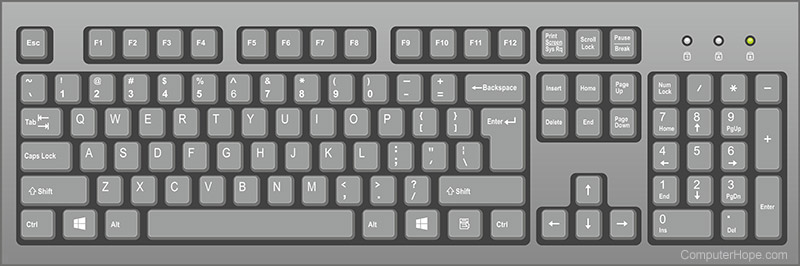
Below is a close up image of a QWERTY computer keyboard with each of the keys selectable. You may hover your mouse cursor over any of the keys to see a description. Clicking any of the keys opens a new page with full details.
Keyboard ports and interfaces
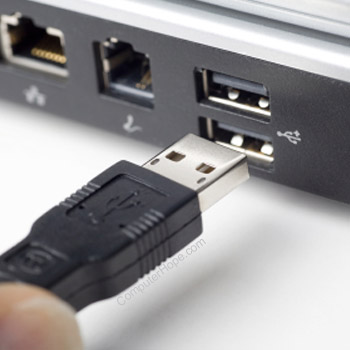
Today, most desktop computer keyboards connect to the computer using either USB or Bluetooth for wireless communication. Before USB, a computer may have used PS/2, serial port, or AT (Din5) as a keyboard interface.
Types of keyboards
Today, most keyboards are similar to each other, but may be missing one or more of the sections mentioned earlier (e.g., the keypad). Where keyboards begin to differ the most is with their constructions. Some keyboards are mechanical, while others use membrane keys. Some keyboards are split down the middle and others even fold in half or roll up. While most keyboards use the QWERTY layout, there are still people who use the DVORAK layout.
Laptop keyboards
A laptop keyboard is arranged differently than a desktop keyboard to accommodate the laptop's narrower footprint. Most laptop keyboards are made smaller by placing the keys closer and by including an Fn key. The Fn key is used in conjunction with other keys to perform special functions. For example, pressing the Fn key and the up or down arrow on the keyboard shown below, increases and decreases the screen brightness. Furthermore, many laptop keyboards omit the numeric keypad to save space.

Smartphone and tablet keyboards

Today's smartphones and tablets do not come with a physical keyboard, although it may be purchased as an optional peripheral add-on. These devices utilize a thumb keyboard or on-screen keyboard to type messages and enter text into various fields. The image is an example of the Apple iPhone on-screen keyboard, used on all Apple touch-based devices.
Why is the keyboard an input device?
A computer keyboard is considered an input device because it only sends data to a computer and does not receive any information back.
What are multimedia keys?
Multimedia keys are those keys which allow the user to control music on their computer keyboard. These keys add functionality such as play, pause, stop, rewind, fast-forward, skip track, eject, shuffle, and repeat.
Also see :- AFK, Alt, Ctrl, Delete, Enter, Hardware terms, Home row keys, Keyboard terms, Natural keyboard, Numeric keypad, OSK, Shift, Spacebar, Tab, Typewriter, Virtual keyboard, Windows key


Comments
Post a Comment